If you are equipping a production line, a stores area or a quality lab with mobile computer stations, you need to know whether a cart will carry your equipment, move easily on your floor and suit the people who use it. We are Sallas Industrial Co., Ltd., a Taiwan manufacturer of monitor mounts, keyboard arms and industrial computer carts, and we have made ergonomic mounting products since 1987. In this article we explain the four choices that decide whether a cart will work well on your floor.
To specify an industrial computer cart, you need to settle four things: the weight of the equipment it will carry, the base and casters, the height adjustment, and the mounts for the monitor, keyboard and computer. If you settle them in that order, you can compare carts on what affects daily use and give a supplier a clear specification.
What your industrial computer cart will need to carry
The load a cart can carry safely is set by its weakest part, whether that is a shelf, a keyboard tray or the clamp that holds an arm to the pole. That is why we would suggest listing your equipment before you look at any cart.
Add up the weight of each item first
Your list should include everything the cart will carry: the monitor and its mount, the computer, the keyboard, any scanner or label printer, and anything operators will set down during the shift, such as parts trays or paperwork. You can then check those weights against the rating of each surface, because a cart that is well within its total rating can still have one surface overloaded.
Per-surface ratings are easy to overlook when you compare carts by their total capacity. On our 60257 mobile workstation desk, for example, the powder-coated steel frame carries about 45 kg (100 lb) in total, shared between three surfaces: 23 kg (50 lb) on the desktop, 9 kg (20 lb) on the pull-out keyboard tray and 14 kg (30 lb) on the bottom shelf. If a monitor, a small computer and a label printer will all sit on the desktop, you should add their weights together and check them against the desktop figure.
Which industrial mobile computer cart suits your station
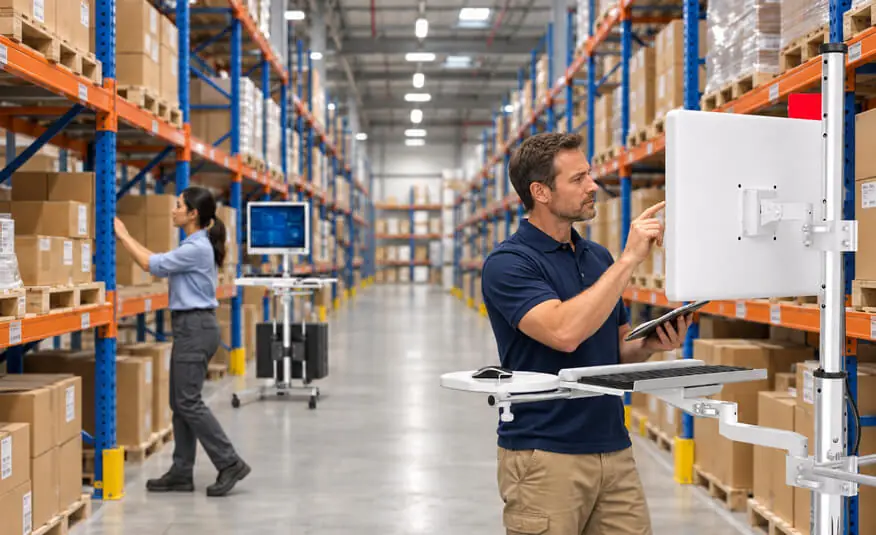
Our computer carts come in two forms. A pole cart, such as the 60250B, carries each item on its own mount fixed to a 50 mm (2 in) electroplated steel pole. You can place the monitor, keyboard and computer where the operator needs them, and the cart takes up little floor space. A desk cart, such as the 60257, gives a flat work surface with shelves below it.
For a station where the operator mainly scans and enters data, we would suggest a pole cart, because its small footprint makes it easier to move between racks and machines. Where the operator also writes, sorts paperwork or uses a printer, a desk cart is usually the better choice. If your carts are for receiving, picking or packing, our article on mobile computer carts in warehouses looks at those stations in more detail.
How to choose the base and casters for your floor
The base and casters decide how easily a cart moves and how steadily it stands while someone is working at it. The UK Health and Safety Executive states, in its guidance on the risks of pushing and pulling loads, that wheels should suit the floor and the environment, and that any brakes need to be effective. It also points out that the cart’s own weight adds to the effort of moving it.
Sallas wheel bases compared
Our pole carts share a set of wheel bases for mobile carts, and you choose the one that suits your floor.
| Base | Wheels | Locking | Fits |
|---|---|---|---|
| #25-34A | Five 100 mm (4 in) heavy-duty wheels | Two lockable | 60250B, 60250T |
| #25-28A | Five 75 mm (3 in) wheels | Two lockable | 60250B, 60250T |
| #25-27H (H-shaped) | Four 75 mm (3 in) casters | All four lockable | 60250B, 60250T |
| #25-27V (V-shaped) | Four 75 mm (3 in) casters | All four lockable | 60250B, 60250T |
Matching the base to how the cart is used
If your carts will cross floor joints, door thresholds, cable covers or ramps, we would suggest the #25-34A base. Its 100 mm wheels tend to roll over obstacles of that kind with less effort than 75 mm wheels. If the cart will stand at one station for long periods while an operator types or leans on it, a base with all four casters lockable will keep it still.
Because the same bases fit both the 60250B and the telescopic 60250T, you can use one base across a whole fleet and still choose the pole to suit each station. If you’re not sure which base suits your site, please tell us what the floor surface is and whether the carts must cross ramps or thresholds, and we’ll suggest one.
How much height adjustment do your operators need?
Sallas carts offer three height arrangements: a fixed pole, a telescopic pole and a pneumatic lift platform. All three are mechanical, so you don’t need to plan for charging or a power supply.
Fixed, telescopic and pneumatic lift carts compared
| Arrangement | Model | Adjustment | Suits |
|---|---|---|---|
| Fixed steel pole | 60250B | Each mount is set at the height where its clamp is fixed | Stations where one task is done at one height |
| Telescopic pole | 60250T | Pole height from 850 to 1,400 mm | Carts that move between tasks and are reset from time to time |
| Pneumatic lift | 60251, 60252 | Platform height from about 790 to 1,040 mm (31 to 41 in) | Shared stations where each operator sets the height at the start of a job |
The pneumatic lift carts use a pneumatic cylinder, released by hand, to raise and lower the platform. The 60251 has a wire controller for one-handed use and five 100 mm heavy-duty wheels, while the 60252 uses a lever and five 75 mm casters. If several people of different heights will use the same cart in a day, we would suggest one of these two.
Setting the monitor and the push height
Height adjustment affects both the screen and the effort of moving the cart. For the screen, the US Occupational Safety and Health Administration, in its guidance on computer monitors, recommends placing the monitor at least 50 cm (20 in) from the operator, with the top line of the screen at or below eye level. An adjustable arm on the pole lets each operator set the screen to that position without changing the height of the whole cart.
The Health and Safety Executive also advises that hands are best placed between hip and shoulder height when pushing a load. It’s sensible, therefore, to check where your operators will hold the cart once the equipment is fitted.
Building your cart from standard parts or ordering a custom one
Sallas carts are built from our range of modular parts, which we also sell separately, and you can start from a standard model and change only the parts that don’t suit your station.
Standard parts you can add to a pole cart
On the 60250B, accessories fix to the pole with a 50 mm (2 in) aluminum alloy pole clamp. The range of pole accessories includes pole-mounted monitor arms, keyboard trays, an adjustable CPU holder (fitted as standard on the 60251), a loop basket (345 x 145 x 120 mm) and the P60257-01 monitor and printer shelf (400 x 250 mm). For tablets, the 60250Pad carries a clamp holder for devices from about 100 to 280 mm (4 to 11 in) on an arm that rotates through 360 degrees.
If your station needs a device we don’t make, such as a battery unit, a barcode printer or a measuring instrument, please send us its dimensions and weight. We can suggest a standard tray or bracket for it, or design a custom component.
Ordering, 3D files and shipping
Our minimum order quantities vary by product but are usually a multiple of ten. We can supply 3D models of our carts and components as STEP files, which most CAD software can open, so that you can check the cart in your own layout before you order. We finish our products by electroplating or powder coating, and all of them comply with RoHS and REACH.
We make all Sallas products in Taiwan and ship them to you directly. We normally ship carts unassembled in separate cases to keep freight costs down, and we can ship them assembled if you would prefer. Please say which you would like when you ask for a quotation, because it changes the freight cost. You can see the full range on our workstation mobile carts page.
If you send us a list of the equipment each cart will carry, with weights, we’ll reply within one working day with a suggested configuration, followed by a quotation. It helps to include the floor surface, the height range you need and the number of carts. You can get in touch with us through the inquiry form or by email at sallas@sallas.com.tw, and if you would like to check the fit first, please ask for the STEP files of the models you are considering.
Frequently asked questions
How much weight can an industrial computer cart carry?
The weight an industrial computer cart can carry depends on the model and on each surface or mount, as well as on the total. The Sallas 60257 desk cart carries about 45 kg (100 lb) in total, with 23 kg on the desktop, 9 kg on the keyboard tray and 14 kg on the bottom shelf. For pole carts, please tell us what you plan to mount and we’ll confirm the configuration.
Which casters should I choose for a factory floor?
For factory floors with joints, ramps or thresholds, larger wheels tend to roll more easily, and the Sallas #25-34A base with five 100 mm (4 in) heavy-duty wheels is the one we would suggest. Where a cart stands at one station for long periods, the #25-27H or #25-27V base, with all four casters lockable, keeps it steadier.
Do Sallas computer carts need a power supply?
Sallas computer carts are mechanical and need no power supply or battery. Height is adjusted by a telescopic pole on the 60250T or by a hand-operated pneumatic lift on the 60251 and 60252. If you plan to fit your own battery unit, please send us its size and weight, and we will suggest a tray or bracket to carry it.
Can Sallas build a custom computer cart?
Sallas can build a cart from standard modular parts to your specification, and we can design custom components or OEM brackets where a standard part will not fit. Minimum order quantities are usually a multiple of ten. Including your equipment list and the number of carts in your first inquiry helps us suggest a configuration more quickly.
Can I get 3D models of Sallas carts for my layout?
Sallas supplies 3D models of its carts and components as STEP (.stp) files, which most CAD software can open. Please contact us with the model numbers you are considering, and we will send the files.